Unlocking Spatial Biology with AI-Driven Image Analysis
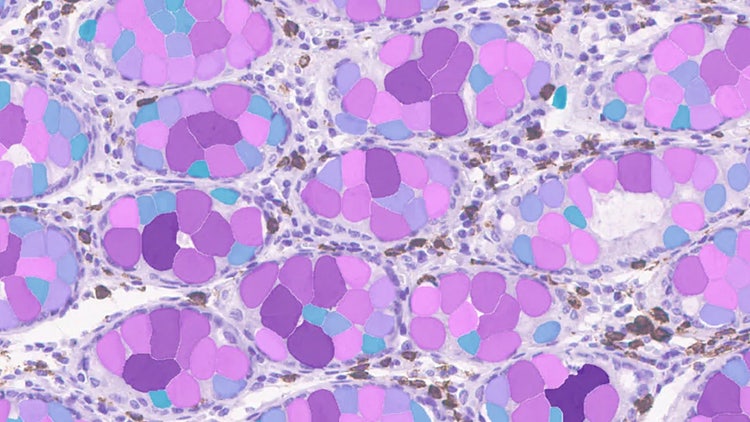
Dr. Quyen Tran, formerly of Leica Microsystems, shares her experience leveraging Aivia AI Image Analysis Software to quickly and accurately analyze, and classify segment cells into different phenotypes and interactively explore them in their spatial context with Aivia.
1) What challenges are commonly faced when analyzing 2D and 3D multiplex images in spatial proteomics, and how does Aivia address these challenges?
Analyzing 2D and 3D multiplex images in spatial proteomics can be challenging due to the large number of biomarkers involved. Images can also be large in the X and Y axes or in three dimensions. These experiments often require advanced visualization, cell detection and phenotyping tools to explore your biomarkers and efficiently analyze the datasets. Aivia addresses these challenges by offering a complete workflow.
Here's a quick overview of some Aivia capabilities.
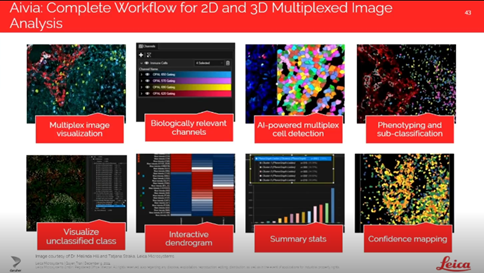
- Visualization of up to 30 channels in 2D and 15 in 3D, with the ability to group markers into biologically relevant categories
- AI-powered cell detection, using both machine learning that is user-guided, painted and deep learning utilizing a modified Cellpose algorithm for accurate segmentation
- Cell classification tools, including expert knowledge-driven phenotyping and data-driven tools that automatically cluster your cells to identify known and unknown phenotypes
- Confidence mapping, which you can utilize for quality control by indicating the reliability of segmentation and the correct phenotype
- Interactive analysis features, such as dendrogram selection, dimensionality reduction and spatial measurements between cell types, allowing users to explore biomarker relationships and spatial context without needing to train models
2) How does Aivia facilitate the analysis of images using biomarkers and AI-driven tools?
Aivia enables the analysis of tissue images by allowing users to visualize and group biomarkers into biologically relevant channels. For example, the software uses a Multiplex Cell Detection recipe to detect cell components by combining multiple biomarkers. You can combine as many markers as you need to get the images required to and the detections your cells of interest. This flexibility ensures that cells of interest are accurately identified, which is critical for downstream analysis like classification and spatial mapping.

Aivia AI Image Analysis Software
Designed to improve accuracy, streamline workflows, and enhance data exploration.
3) How does Aivia facilitate the classification of cells?
Once cells are detected, users can classify them using Phenotyper, which is AI-driven and leverages the researcher’s expertise. Additionally, Aivia offers PhenoGraph Laden, a data-driven method that automatically clusters cells based on biomarker expression without requiring training examples. These clusters can then be visualized spatially within the tissue and further analyzed with tools like dendrograms and spatial relationship maps to reveal biological insights. Spatial relationships between clusters can be measured and displayed, including 3D images, with exportable measurements and customizable color maps. This makes Aivia especially powerful for discovering novel or unexpected cell populations in complex datasets.
Innovative AI Software Solutions Driving Biomarker Research Efficiency
Biomarker discovery and validation are critical for advancing your personalized medicine and improving therapeutic outcomes. However, the complexity of high-throughput assays and image-based analyses presents significant challenges in extracting meaningful insights efficiently.
References
- Stringer, C., Wang, T., Michaelos, M. et al. Cellpose: a generalist algorithm for cellular segmentation. Nat Methods 18, 100–106 (2021). doi.org/10.1038/s41592-020-01018-x